
3. Broken Link Visits
Ablestar Link Manager allows you to quickly scan a list of missing store links, with an option to add redirects or export the full list. There are several tab views to display various data.
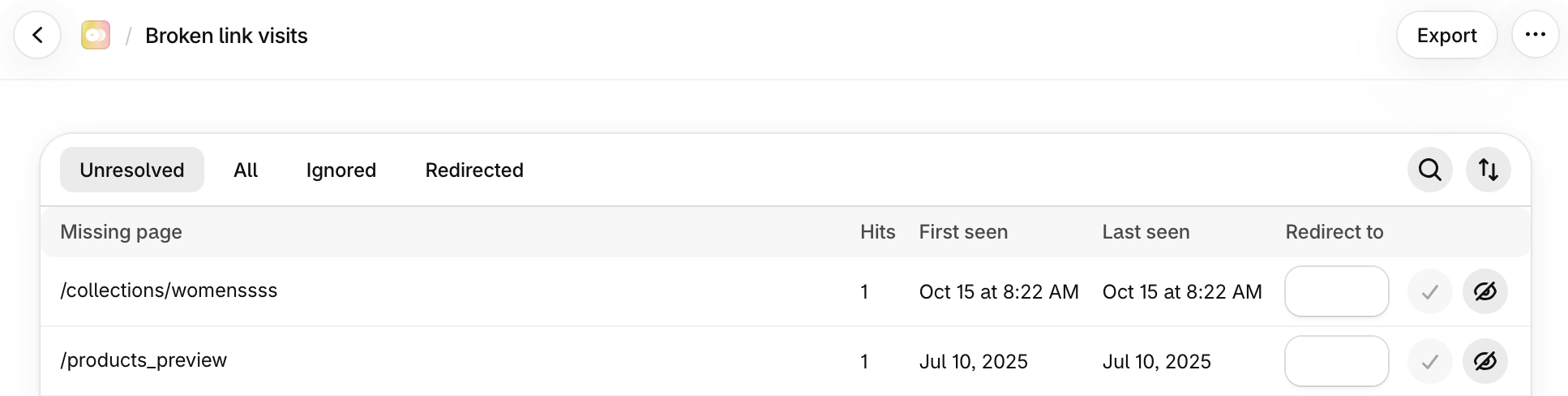
Options available on each view include:
- Search: allows you to search for keywords, specific text in quotes
- Sort: re-sort the list view by ascending/descending, most recent hit, missing page, or first/last seen
- Redirect to: input field for the new redirect
- Checkmark: this will save the new redirect specified
- Eye icon: clicking the ignore/unignored icon will pause the redirect or make it active again
Click the tab to find specific filters on your broken links:
1. Unresolved Tab
Using the Unresolved Tab filter, you can jump quickly to the list of all unresolved items. Specify new redirects for users who may have saved a bookmark with an old URL. You can sort, modify, or export as needed.
2. All Tab
Essentially the same as the Unresolved tab but also includes those that are already resolved. You can visit the settings page to clear out all previous reports. You can sort, modify, or export as needed.
Clearing broken link visits is permanent and cannot be undone.
3. Ignored Tab
This lists any links that you may have previously marked as 'Ignored'. You can sort, modify, or export as needed.
4. Redirected Tab
This view lists all items that have already been redirected. You can sort or export as needed.
Exports
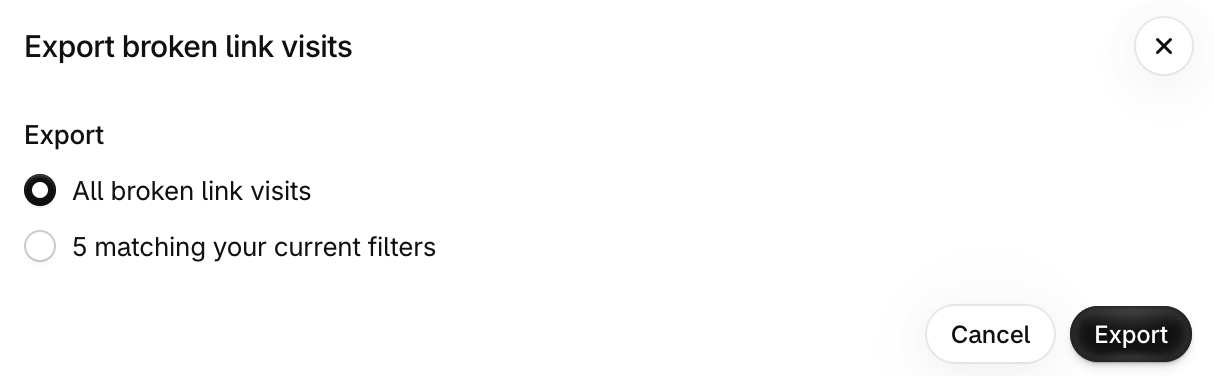
Click Export to download a local copy of the current view of filtered items, or all broken link visits:
✅ Tips and Troubleshooting
- Get started scanning broken links
- Learn advanced search tips on redirects
(lm.344)